For search & rescue teams
Hearthguard Location Detective — field guide
This page explains what Hearthguard provides during a missing-person search involving an older adult who drives a Tesla and may carry an iPhone. It is written for incident commanders, ground teams, and law-enforcement liaisons who receive a SAR briefing link or responder PIN from a family caregiver — not for families setting up the product.
1. Overview
Hearthguard is a household safety platform used by families and caregivers to monitor an older adult who drives. When someone may be missing — especially a person with dementia or Alzheimer's — caregivers on a Guardian or Premium plan open Location Detective in the web portal or caregiver iPhone app.
Location Detective is decision support, not dispatch. It:
- Fuses Tesla vehicle GPS, elder iPhone GPS, and family-reported last seen into a single point last seen (PLS) assessment.
- Ranks where to search first using trip history, safe zones, dementia heuristics (Koester-style), and optional AI narrative.
- Estimates a vehicle drivable containment circle when car telemetry goes offline, using battery state and charging history.
- Attaches weather, elevation, and map terrain (water, roads, trails) at the search area.
- Produces shareable SAR briefings, NIMS ICS PDFs, and GPX/GeoJSON for GIS tools.
2. Disclaimer
- Briefing and EMS share links expire (typically 24–72 hours depending on artifact).
- Responder PIN handoffs expire after 48 hours with a maximum of 15 redemptions per invitation.
- Vehicle GPS can be stale when telemetry is offline; containment math uses the last known ping.
- iPhone GPS tracks the phone, not always the person (phone may be in the car).
- US customary units are used throughout: miles, °F, mph, feet.
3. How you get access
Families share information with field teams through three main channels:
| Channel | What you receive | Authentication |
|---|---|---|
| SAR briefing link | Standalone HTML briefing: PLS, ranked zones, vehicle containment, weather, SAR checklist, AI summary if enabled | Opaque URL token — no login (/api/briefing/{token}) |
| Responder PIN | Email invitation with 8-digit PIN to open full SAR briefing (same content as briefing link) | PIN at /responder — 48-hour TTL, max 15 redemptions; brute-force throttled |
| EMS bundle | ICE wallet, medications, allergies, recent vitals — for medical emergencies (not full search zones) | Token URL at /ems |
| ICS PDF / GPX files | Caregiver exports from Detective → Coordinate tab and sends via email/radio | Files only — no live link |
What to ask the family for
- The SAR briefing link (fastest full picture).
- Clothing, direction of travel, and cognitive status (may not be in the system yet).
- Whether Missing person mode is active in the app (preserves incident artifacts).
- Whether the elder has the iPhone app with Always Allow location.
4. Data sources
Each analysis run (analyzeWhereaboutsFn) loads household data and writes a snapshot to whereabouts_insights. Sources include:
| Source | Update frequency | SAR relevance |
|---|---|---|
| Tesla Fleet Telemetry | ~10 s location, ~60 s battery while online | Live or last-known vehicle position, charge %, shift state, seat occupancy, speed |
| Charge sessions | On plug/unplug events | Where/when the car last charged; SOC at end of session; supercharger vs home |
| Vehicle trips | Each drive/park cycle | Frequent destinations, sundowning patterns, miles per % battery for range estimate |
| Elder iPhone pings | ~5 min or 75 m movement | Person location when away from vehicle; divergence from parked car |
| Safe / watch zones | Caregiver-configured | Home, clinic, childhood home — ranked search candidates |
| Detective intel profile | Caregiver-edited | Former homes, churches, friends, LPQ answers, point last seen report |
| Observations journal | Append-only caregiver notes | Recent behaviors, places, habits with timestamps |
| Health profile / ICE | Caregiver + optional FHIR portal | Conditions, meds, allergies — in briefing medical block |
| Open-Meteo + OpenStreetMap | At analysis time | Weather at PLS, elevation band, nearby water/trails/roads |
5. Point last seen (PLS) fusion
The briefing shows Best last known — the highest-confidence PLS from competing sources:
- Family-reported point last seen (caregiver intel) — highest weight when entered with time and place.
- Elder iPhone GPS — freshness-weighted (strong if < 30 min).
- Vehicle GPS — live when online; down-weighted when offline and a fresher phone ping exists.
Coordinates are shown in decimal degrees and UTM where available. The red LK map pin and dashed 1 mile circle reflect Koester dementia wandering baseline (~89% rural finds within 1 mi of PLS).
Coordinates are normalized to WGS84 at fusion time — swapped latitude/longitude from upstream sources is corrected so the map pin, decimal text, and UTM values all agree. If a briefing was generated before a coordinate fix, ask the family to tap Refresh analysis and re-share the link.
6. Vehicle telemetry
While the Tesla is online, treat vehicle GPS as authoritative for car position. The briefing and map show:
- Location — lat/lng, heading when moving
- Battery % — state of charge at last telemetry
- Shift state / speed — parked vs driving
- Seat occupancy — driver seat empty while parked suggests possible exit on foot
- Charging state — plugged in at last ping implies zero drivable range from that point
When telemetry goes offline, the vehicle position is frozen at the last successful upload. The SAR checklist will note offline status and recommend weighting phone GPS and family PLS over stale car GPS.
7. Vehicle containment radius
When the vehicle is unreachable (offline), Location Detective computes estimated drivable range from the last vehicle GPS and battery state. This answers: “If the car drove away from this point on the energy it had, how far could it have gone?”
How range is calculated
- Anchor — last valid vehicle GPS coordinate and timestamp.
- Charging at anchor — if the car was plugged in (Charging/Starting/Complete), range = 0 mi.
- Charge session anchor — if a completed charge ended within ~500 m of the anchor, SOC may be taken from that session's end battery %.
- Efficiency — median miles per 1% SOC from household trip history (≥3 trips); otherwise conservative default 2.5 mi per % (~250 mi full pack).
- Range —
battery% × miles per %, rounded to one decimal.
How it appears on the map
- Amber dashed circle centered on last vehicle GPS (V pin) — containment radius in miles.
- Red 1 mi circle at fused PLS — Koester foot-search heuristic (unchanged).
Containment mode vs foot-search mode
Range-based filtering and zone capping apply only in vehicle containment mode: offline vehicle and no strong evidence the person left on foot (no driver seat exit signal, no iPhone–vehicle divergence > 200 m).
If the timeline shows seat exit or iPhone divergence, Koester foot-search zones dominate; the amber circle remains informational but destinations are not penalized for being outside EV range.
Ranked destinations beyond range
In containment mode, habitual destinations farther than ~2× estimated range are deprioritized and flagged
beyond vehicle range in the ranked list. SAR zone radii (0.25–1.25 mi bands) are capped by
min(koester_band, estimated_range) when the battery-constrained radius is smaller.
8. Elder iPhone GPS
A separate Elder iPhone app sends background GPS pings when the elder grants Always Allow location. Pings typically fire every ~5 minutes or ~75 meters of movement.
- Purple pin on caregiver maps; shown alongside vehicle in briefings.
- Divergence alert — phone > 200 m from a parked vehicle suggests the person may have left on foot; switches search logic toward Koester radii.
- Accuracy (±m) may be shown when the device reports it.
- Phone left in the vehicle will follow the car — correlate with seat occupancy and trip state.
9. Trip patterns & caregiver intel
Historical trips
Completed trips store start/end GPS, path distance, time-of-day, and battery delta. The engine clusters destinations and scores them by visit count, day-of-week, and sundowning risk (evening wandering).
Family profile (Prepare intel)
- Former residences, churches, favorite places
- Regular activities (day/time)
- Friends & family places
- LPQ — Lost Person Questionnaire (Koester-style structured answers)
- LPB profile — dementia / domain (urban-suburban-rural) / severity
Observations journal
Timestamped caregiver notes (habits, places, behaviors) boost matching destinations in the ranked list.
Prior incidents
Resolved searches contribute find locations and distances for repeat-pattern weighting.
10. Search zones & Koester probability bands
Ranked locations (#1, #2, …) each receive a SAR probability band and reflexive task category:
| Band | Default radius | Typical tasking |
|---|---|---|
| 25% | 0.25 mi | Hub — structures immediately at PLS |
| 50% | 0.5 mi | High probability — familiar short loops |
| 75% | 0.75 mi | Travel corridors — roads, trails, drainages |
| 95% | 1.25 mi | Containment — outer dementia wandering envelope |
Reflexive tasks (investigation, ipp_locale, hub_25pct, containment, travel_corridors, high_probability, water_features) align with Koester investigative structure. AI may regroup tips into these categories when Grok is enabled; a flat search priority list is always provided for backward compatibility.
Each zone includes bearing from PLS (degrees), terrain hints, and coordinate links for navigation apps.
11. Weather & terrain
At analysis time the system enriches the PLS with:
- Weather — Open-Meteo: temperature (°F), wind, precipitation; summary text for searcher safety and subject exposure.
- Elevation band — feet, rough category (lowland / upland).
- Map features — Overpass/OSM within ~1.5 mi: water, woods, buildings, paths, roads.
- Caregiver LPQ terrain — parallel column; AI reconciles conflicts in terrain tips when both exist.
Use weather at time last seen for subject exposure; use current weather for team safety.
12. Medical & ICE context
Briefings and EMS bundles may include from the household health profile:
- ICE wallet — allergies, conditions, blood type, physician
- Medication list (manual + patient portal FHIR import)
- Recent vitals — steps, heart rate, sleep from Apple Health (hourly sync on elder iPhone)
- Escalation contact tree for caregiver notifications (not 911 dispatch)
EMS bundle (/ems) is optimized for medical handoff; SAR briefing focuses on search geometry and tactics.
13. Timeline & automatic signals
The analysis builds a chronological timeline. Events you may see:
- Vehicle telemetry updated / Vehicle went offline
- ~N mi drivable from last vehicle GPS — containment estimate with battery detail
- Possible exit on foot — parked, driver seat empty
- iPhone divergence — phone separated from parked vehicle
- Geofence exit — left a registered safe zone
- Family intel / phone ping markers
Portal re-analysis triggers include: vehicle going offline (15 min cooldown), geofence exit, seat exit, phone–vehicle divergence, and manual Refresh analysis.
14. SAR briefing document
The SAR briefing is a standalone HTML page — no Hearthguard login. Caregivers generate it from
Location Detective (Share SAR briefing) or email a responder PIN that opens the same
content at /responder. Screenshots below are from a representative demo incident (fictional subject);
your live briefing will show the household's real coordinates, zones, and medical context.
/api/briefing/{token}; (2) caregiver PIN →
hearth-guard.com/responder → full briefing. Responder PINs last 48 hours (max 15 redemptions).
Both show an expiry countdown in the header.
/responder, enter PIN 42424242 for the Margaret Chen sample briefing.
Demo PIN does not expire — use for training and field presentations.
Responder PIN entry
Agencies without the direct link receive an email with an 8-digit PIN. The entry screen is mobile-friendly and does not require a caregiver account.
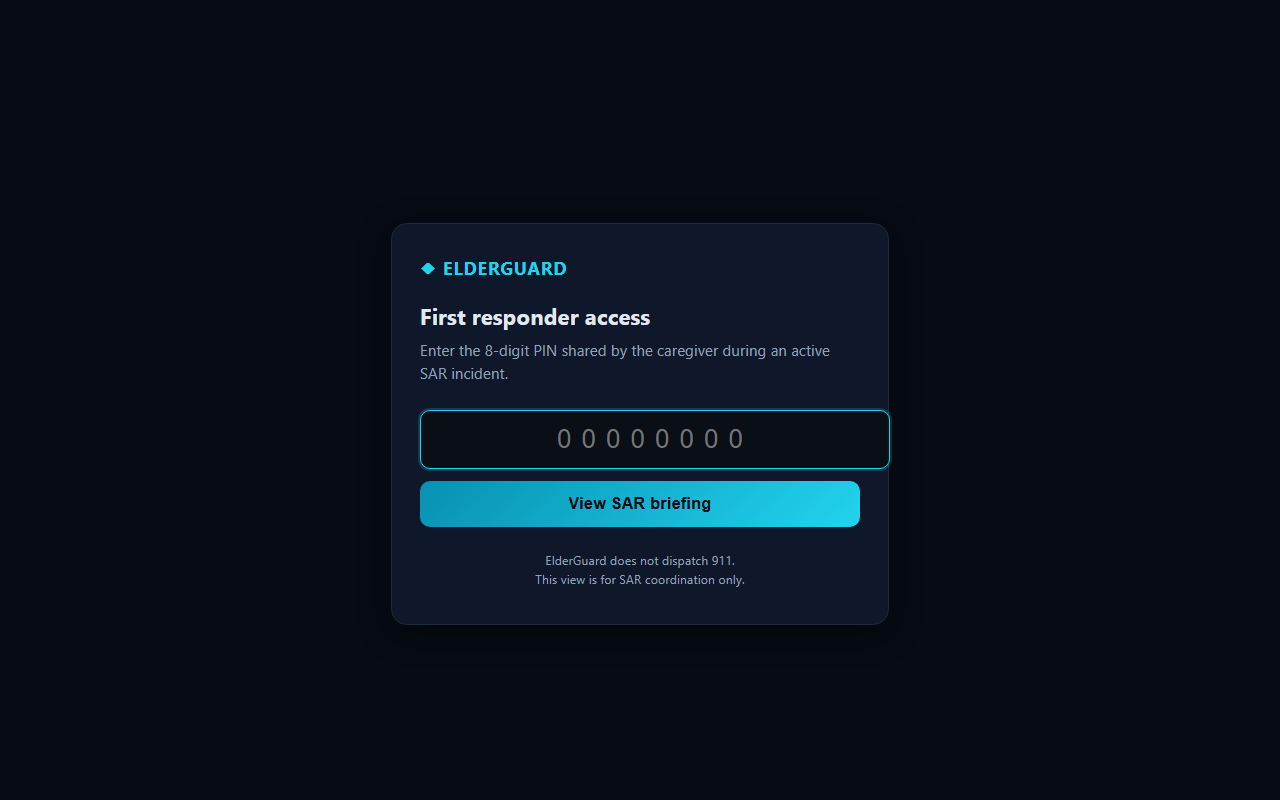
/responder — PIN from caregiver email invitation.Live briefing layout
After PIN entry or opening the briefing link, field teams see a single scrollable operations page with a sticky section nav (Map · PLS · Zones · Vehicle · Containment · Medical · ICS · …) for jump navigation on tablets.

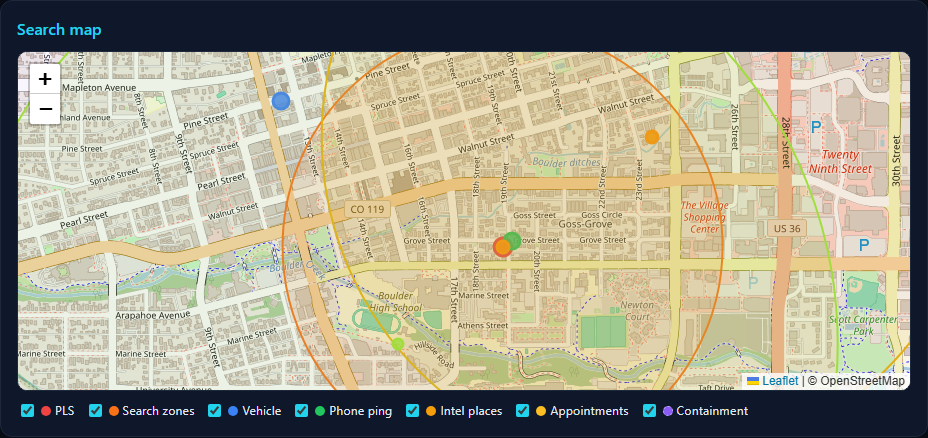
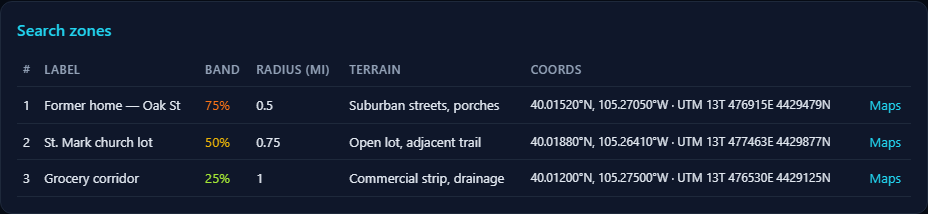
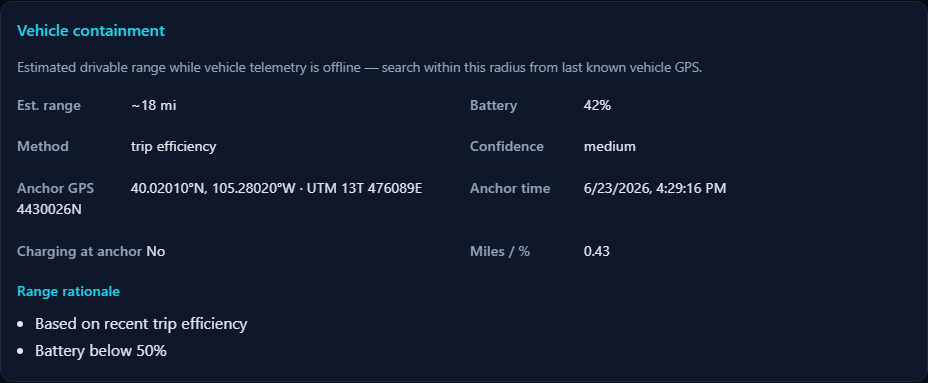
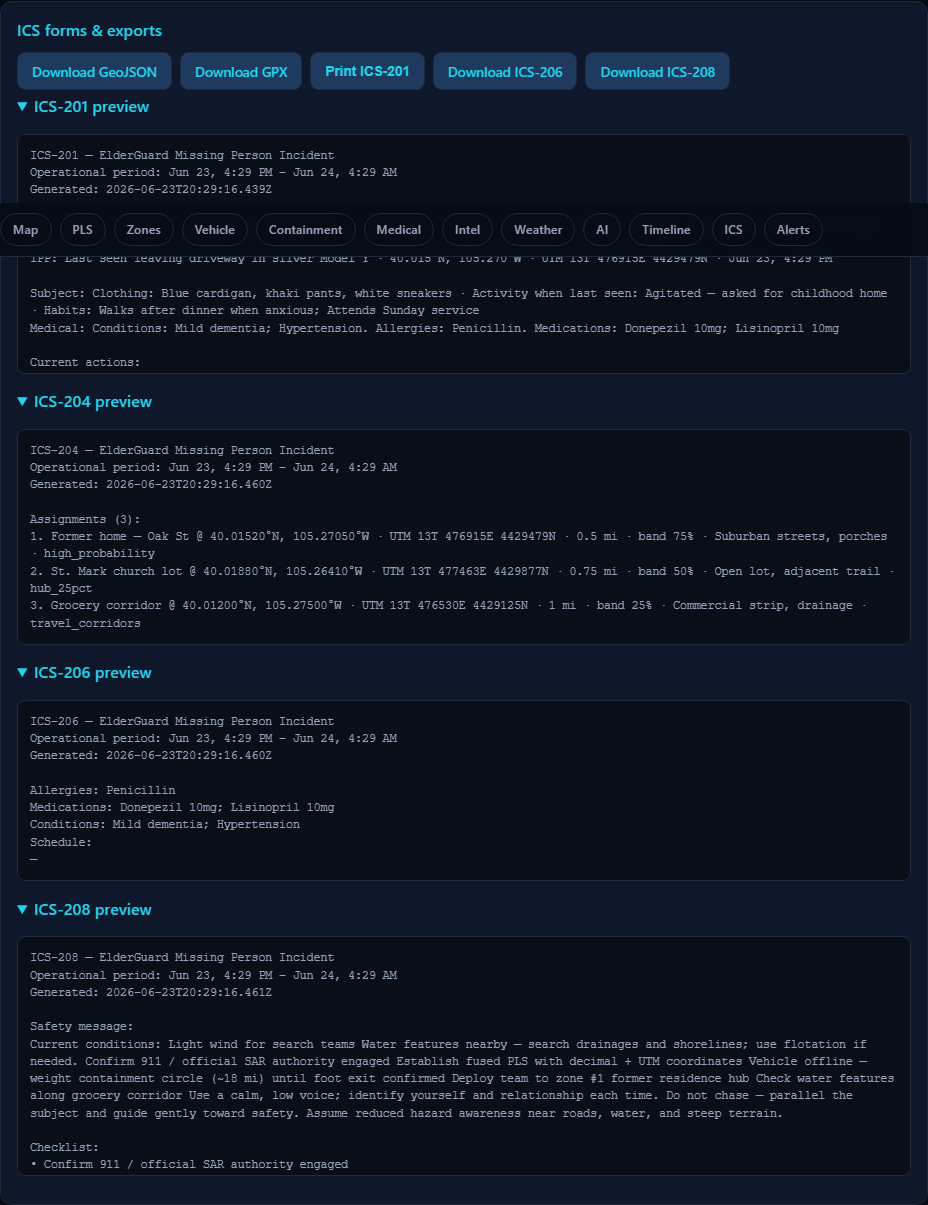
Open interactive demo briefing ↗ — scroll the full page in a new tab (sample data only).
15. Briefing sections reference
Section nav order adapts to available data. Typical blocks and what to use in the field:
| Section | Field use |
|---|---|
| Map | Leaflet map — PLS pin, vehicle anchor, containment circle, zone markers; pan/zoom on tablet; layer legend toggles; export geometry in ICS section. |
| PLS | Fused coordinates, family-reported last seen (clothing, activity), decimal + UTM. |
| Zones | Ranked search assignments — start at #1; note probability band and reflexive task. |
| Vehicle | Last telemetry: shift state, battery, lock, seat occupancy, heading. |
| Containment | EV drivable radius when offline — filters zones in containment mode. |
| Phone ping | Latest elder iPhone GPS with accuracy and timestamp. |
| Medical | ICE conditions, allergies, medications — coordinate with EMS bundle if needed. |
| Intel | Former homes, churches, habits, friends — caregiver-entered context. |
| Appointments | Upcoming Epic/calendar events with map links when FHIR connected. |
| Weather | Conditions at PLS vs current — subject exposure vs team safety. |
| AI | Search summary, priority list, reflexive tasks (probabilistic — verify against zones). |
| Timeline | Offline events, containment estimate, seat exit, phone divergence. |
| SAR checklist | 911 reminder, Koester tactics, offline/battery notes. |
| ICS | GeoJSON, GPX, ICS form text blocks, ISRID Silver CSV. |
| Alerts | Open SOS and safety events at briefing generation time. |
Refresh: ask the family to tap Refresh analysis in Location Detective before re-sharing if the situation changed (vehicle back online, new family PLS, etc.).
16. ICS forms & map exports
Caregivers with portal access can export from Detective → Coordinate:
| Export | Purpose |
|---|---|
| ICS-201 | Incident briefing — situation, weather, hazards |
| ICS-204 | Assignment list — search branches with terrain hints |
| ICS-206 | Medical plan |
| ICS-208 | Safety message — weather lines |
| ICS-209 | Status summary — weather/terrain remarks |
| ICS-214 | Activity log — import team GPS tracks (.gpx / .geojson) |
| GeoJSON / GPX | PLS, zones, and candidates for GIS or Avenza |
| ISRID Silver CSV | Post-incident statistical closeout export |
FEMA PDF templates are pre-mapped field fills. Caregivers should verify operational period dates and incident name before printing.
17. Recommended field workflow
- Open the SAR briefing link on any device; save PDF print if the caregiver exported one.
- Confirm authority — Hearthguard supports the family; official SAR/LEAD remains with agency IC.
- Read PLS fusion — note whether vehicle or iPhone is fresher; check timeline for seat exit / divergence.
- Interpret containment — if amber circle is shown, prioritize searchable area inside it when containment mode applies; otherwise prioritize 1 mi Koester foot envelope at PLS.
- Deploy to ranked zone #1 — work outward through bands; assign corridors and water features per reflexive tasks.
- Use weather/terrain block — adjust night search, hypothermia risk, drainage checks.
- Request refresh if vehicle comes back online or new family PLS is reported.
- Closeout — ask family to resolve incident in app for ISRID data; import ICS-214 tracks if teams used GPS loggers.
18. Limitations
- No guarantee of find location inside ranked zones or containment circle.
- EV range is energy-based, not traffic/topography adjusted (no per-model EPA lookup).
- Tunnel, garage, and cellular dead zones delay or freeze telemetry.
- AI narrative optional — pattern engine works without xAI; wording may vary.
- Requires prior caregiver setup (Tesla link, zones, intel) for best results — ad-hoc missing-person mode still works with GPS alone.
- Guardian+ subscription required for Detective; families on Essential tier cannot generate briefings.
19. Glossary
- PLS
- Point last seen — initial planning point for search.
- LPQ
- Lost Person Questionnaire — caregiver answers mapped to Koester reflexive tasks.
- LPB
- Lost Person Behavior profile — dementia, child, hiker, etc.
- Containment mode
- Vehicle offline without foot-exit signals; EV range filters apply.
- Fused last known
- Winning candidate among vehicle, iPhone, and family PLS.
- Reflexive task
- Koester search grouping: investigation, locale, hub, corridors, water, etc.
- ISRID Silver
- International SAR incident database closeout format.